Little Snitch for Linux — Because Nothing Else Came Close
 Christian on Little Snitch —
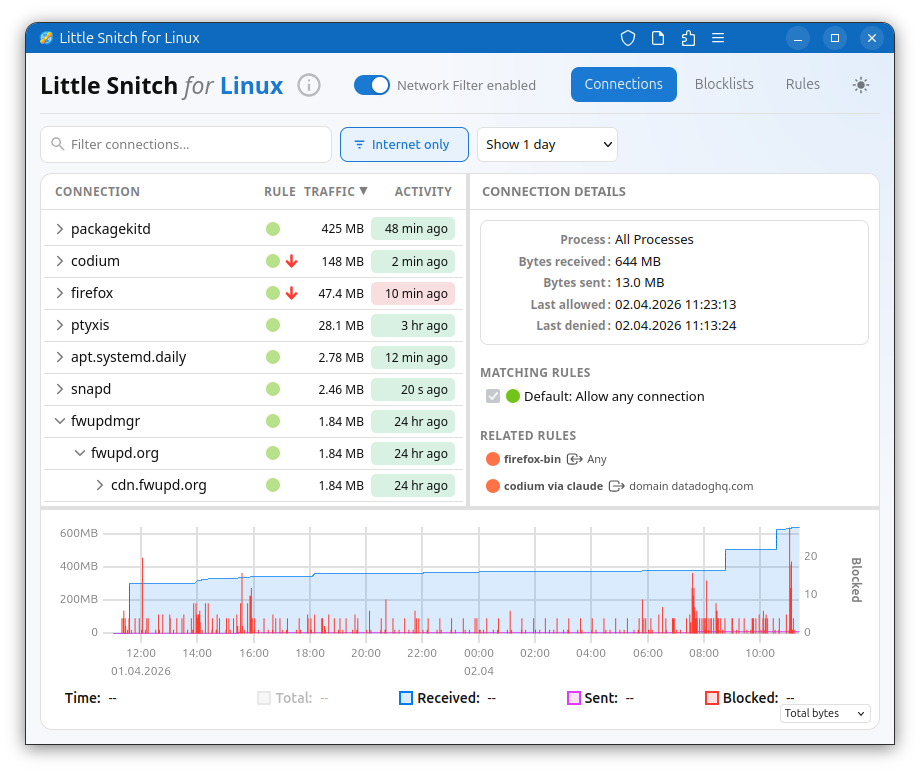
Recent political events have pushed governments and organizations to seriously question their dependence on foreign-controlled software. The core issue is simple and uncomfortable: through automatic updates, a vendor can run any code, with any privileges, on your machine, at any time. Most people know this, but prefer not to think about it. Linux is the obvious candidate for reducing that dependency: no single company controls it, no single country owns it. So I decided to explore it myself.
I installed it on some older hardware we had around. Then installed apps. It turned out that I don’t need a lot: browser, mailer, text editor, development environment, git client, Signal, Wireshark and a couple of others. I can’t do Mac development on Linux, but that was to be expected.
Very soon after that, I felt kind of naked: being used to Little Snitch, it’s a strange feeling to have no idea what connections your computer is making. I researched a bit, found OpenSnitch, several command line tools, and various security systems built for servers. None of these gave me what I wanted: see which process is making which connections, and in the best case deny with a single click.
Little Snitch was clearly missing, so I started building it.
To make a long story short: I decided to use eBPF for traffic interception at kernel level. It’s high performance and much more portable than kernel extensions. The main application code is in Rust, a language I’ve wanted to explore for quite a while. And the user interface was built as a web application. That last choice might seem odd for a privacy tool, but it means you can monitor a remote Linux server’s network connections from any device, including your Mac. Want to know what Nextcloud, Home Assistant, or Zammad are actually connecting to? Use Little Snitch on the server.
Like an Old Friend on New Hardware
Now, having a variant of Little Snitch on Linux, how does it feel? Is Linux better than a Mac in terms of privacy?
There are two questions to answer: one is about the system itself, the other about the apps you install.
A Surprisingly Quiet System
I noticed a difference already during development: when testing on macOS, it takes at most 5 seconds before a process communicates and I see network traffic. When testing on Linux, on the other hand, it often takes a minute or more until I can spot a connection. It all depends on the Linux distribution you install, of course. I used Ubuntu just because it’s so widespread, and as a developer, it’s a good idea to use the same setup as your users.
Ubuntu is relatively calm on the network, but still sends feedback to Canonical via a declared metrics channel (ubuntu-insights connecting to metrics.ubuntu.com) and various software update channels. You can deny the metrics, but you won’t want to disable updates — and there’s the familiar problem again. You have traded dependence on one company for another. The difference with Linux is that you can choose: there are many distros, and you can choose whom you trust. And as a big organization, you could even maintain your own distribution.
But in summary: on Ubuntu, I found 9 system processes making internet connections over the course of one week. On macOS, we counted more than 100.
Not All Apps Phone Home
The first app installed on every computer is usually the web browser. Only after installing the web browser can you search for software other than the basics provided with your distribution.
My Ubuntu came with Firefox pre-installed, so I can mainly speak to that one. The first thing I did was to start Firefox, but not use it for browsing. To my surprise it immediately showed me ads, and Little Snitch confirmed that it connected to ads.mozilla.org, incoming.telemetry.mozilla.org and many more. Knowing this, I went into the preferences and disabled most of the ads and tracking. But it still connects to some of these servers.
My recommendation: If you use a browser, start it and let it sit unused for at least a day. Then check the connection history and decide what you can disable in the settings, what you want to keep and what you want to deny in Little Snitch.
The next thing I did was web browsing. Needless to say that news sites live from tracking and ads, otherwise they could not provide their content for free. But did you know that some of these sites use somewhere between 50 and 100 trackers? I don’t want to blame anyone here, so try it yourself.
As far as other apps are concerned: each app behaves more or less the same way on all supported platforms. If you install Thunderbird, Visual Studio Code or any other major player, expect the same kind of metrics you see on other platforms. I found one notable exception, though: LibreOffice. I started LibreOffice Writer just for testing, and it made no network connections at all! Quite unusual these days!
Free, Functional, and Open Where it Counts
From a feature perspective, Little Snitch for Linux sits somewhere between Little Snitch Mini and the full Little Snitch: functional and useful, but without all the polish and depth of the macOS version. Think of it as an honest first version. The Mac version remains where our deepest work lives, and that isn’t changing.
The kernel component, written for eBPF, is open source and you can look at how it’s implemented, fix bugs yourself, or adapt it to different kernel versions. The UI is also open source under GPL v2, feel free to make improvements. The backend, which manages rules, block lists, and the hierarchical connection view, is free to use but not open source. That part carries more than twenty years of Little Snitch experience, and the algorithms and concepts in it are something we’d like to keep closed for the time being.
One important note: unlike the macOS version, Little Snitch for Linux is not a security tool. eBPF provides limited resources, so it’s always possible to get around the firewall for instance by flooding tables. Its focus is privacy: showing you what’s going on, and where needed, blocking connections from legitimate software that isn’t actively trying to evade it.
And finally a word on compatibility: we developed on Ubuntu 25.10 with a 6.17 kernel, and have confirmed it works on kernel 6.12 and above. On older kernels we currently hit the eBPF verifier’s maximum instruction limit. In theory, compatibility down to kernel 5.17, where bpf_loop() was introduced, should be achievable, which would cover Debian 12 (Bookworm) and Ubuntu 24.04 LTS (Noble). If you have the expertise to help, that’s one of the areas where contributions would make a real difference.
You can find Little Snitch for Linux here. It is free, and it will stay that way.
Enjoy it.